


Any Help Would Be Helpful!


Thread Starter
|
BOMBARDIER

Joined: Feb 2008
Posts: 1,759
Likes: 10
 Any Help Would Be Helpful!
 - And Thats How I Feel About Now.
Trying To Set Up The New Emails For My Company, The New Advertisements Are Launched Monday With The NEW Emails - Yet None Of Them Really Work.
Here Is The Deal. With My Server Email accounts All Set Up With Passwords, Using Outlook As my Client - I Can Successfully Receive Emails, But Cannot Send Them. (Outgoing Server Requires Authenticity [SMTP]) I Have Selected That, Entered My Info But It Still Fails To Send EMAIL!!
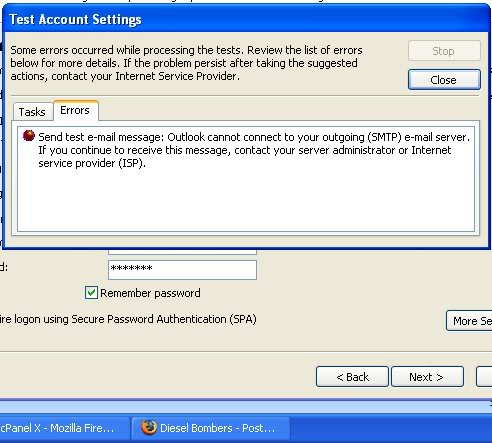
Anyone Have A Clue?? "My Guy" Is Not Available Today

Diesel Fan
Joined: Jan 2008
Posts: 85
Likes: 7
From: Memphis
When you checked the box "My outgoing server (SMPT) requires authentication",
did you also check the box at the bottom of the page: "Log on to incoming mail servere before sending mail? If not, try that.
If that doesn't work, you have 2 more options right there...
did you also check the box at the bottom of the page: "Log on to incoming mail servere before sending mail? If not, try that.
If that doesn't work, you have 2 more options right there...

Thread Starter
|
BOMBARDIER
Joined: Feb 2008
Posts: 1,759
Likes: 10
I Gotcha, I Tried That Also..
When i Run The "Test" It Says "Log Onto Incoming Mail Server (POP3)": Sucessful
Then The Test Email Fails With The Error Message From Above.
When I Require Logon Using SPA - It Fails The Log On..
There Is Gotta Be A Setting I Am Missing. Elsewhere. I Already Configured Outlook With My Server.
... Would The Fact That I Don't Use Exchange Be An Issue???
When i Run The "Test" It Says "Log Onto Incoming Mail Server (POP3)": Sucessful
Then The Test Email Fails With The Error Message From Above.
When I Require Logon Using SPA - It Fails The Log On..
There Is Gotta Be A Setting I Am Missing. Elsewhere. I Already Configured Outlook With My Server.
... Would The Fact That I Don't Use Exchange Be An Issue???

You have your SMTP Configured Wrong
Some time your user name isnt just

its
@youremail.com
in the settings
Some time your user name isnt just
its
@youremail.comin the settings
Last edited by DB Admin; May 8, 2008 at 09:23 PM.